Lukki casino app — play on mobile without downloading anything
Lukki casino does not force you to search for APK files or scroll through app stores — the full casino works directly in your mobile browser, with the same games, bonuses and payment options that you see on desktop.
Instead of maintaining a heavy native app, Lukki focuses on a fast, responsive website that behaves like an app: you open it in Safari or Chrome, log in once and then move between slots, live tables and crash games with just a few taps.
Is there an official Lukki casino app?
There is no separate Lukki casino app in the App Store or Google Play — and that is by design. The mobile version of the website is built to behave like an app, so you do not need to download anything to play.
This approach avoids a common problem in online gambling: fake applications and unofficial APK files that copy casino branding but have nothing to do with the real platform. With Lukki, the safest route is always the same — open the official website in your browser.
All important features are available in the mobile version: registration, login, deposits, withdrawals, bonuses, game history and support.
Mobile browser vs classic casino apps
Lukki’s mobile site is not a “cut-down” version of the casino. It is a full product that acts like an app while staying in your browser, which has several practical advantages compared with traditional downloadable applications.
| Aspect | Lukki mobile browser | Typical casino app |
|---|---|---|
| Installation | No installation; open in browser | Requires download and updates |
| Updates | Always up to date automatically | Needs manual or store updates |
| Storage | Uses almost no device storage | Takes space on phone or tablet |
| Security risk | Low, if using the official website | Higher if using APKs or clones |
| Access speed | Instant via bookmark or shortcut | Fast once installed, but tied to the app |
| Cross-device use | Same site and account on any browser | Separate installation on each device |
In practice, the Lukki browser version gives you the benefits of an app without the maintenance, storage or security issues that often accompany downloadable casino software.
How Lukki casino works on mobile
The interface rearranges itself automatically to fit your phone or tablet. Menus collapse into clean icons, game tiles are resized for touch and important buttons such as “deposit” or “withdraw” stay visible without feeling intrusive.
Slots generally load in portrait mode and can be played comfortably with one hand, while live casino tables and game shows often look best in landscape, giving you a wider view of the studio or table.
Your balance, bonuses and account details stay perfectly synced between devices, so you can start playing on desktop and continue later from your mobile without any extra steps.
How to create a Lukki “app” shortcut on your phone
If you like the idea of an app icon on your home screen, you can turn the Lukki mobile site into a shortcut that behaves very similarly to a native app.
On Android (Chrome)
- Open the official Lukki website in Chrome.
- Log in or create an account if needed.
- Tap the menu button (three dots in the corner).
- Select “Add to Home screen” or “Install app”.
- Confirm the name and tap “Add”.
After this, Lukki appears on your home screen as an icon — tap it to go straight into the mobile lobby.
On iOS (Safari)
- Open the official Lukki website in Safari.
- Tap the share icon in the browser.
- Scroll down and choose “Add to Home Screen”.
- Confirm the name and tap “Add”.
The icon will behave much like an app: it opens Lukki in a full-screen view without additional browser controls.
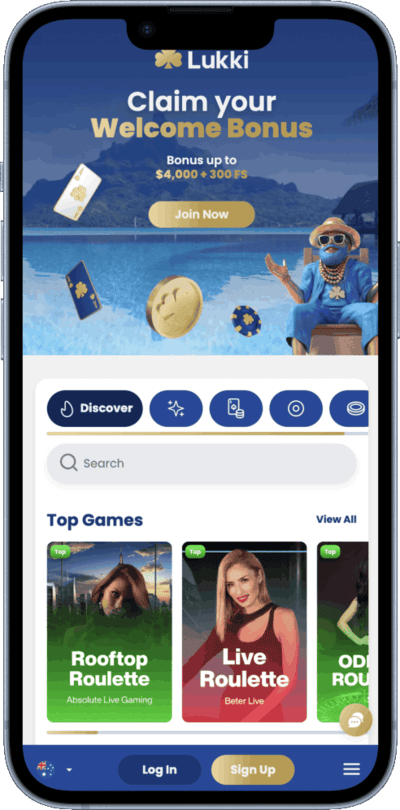
Games available in the Lukki mobile version
The mobile version of Lukki does not limit your choice of games. Almost all titles that you see on desktop are also available on a phone, including slots, live casino, crash games and game shows.
Game providers design most modern releases with mobile in mind, so features and payout structures remain identical across devices — you are not playing a different version of the game just because you switched to a smaller screen.
Live casino streams automatically adjust quality based on your connection. On a stable Wi-Fi or 4G/5G network, the picture stays smooth and sharp; with weaker connections the resolution may drop slightly to preserve consistent gameplay.
Payments and bonuses on mobile
Deposits and withdrawals work exactly the same on mobile as they do on desktop. You can add cards, use e-wallets, send and receive cryptocurrency and review your transaction history directly from your phone.
Bonus activation also happens inside the same interface: you can claim welcome offers, reloads and cashback from the promotions or account section without switching to a computer.
This makes mobile a complete environment for Lukki — not just a side version where you can only spin a few slots but must “go back to desktop” for everything serious.
Pros and possible downsides of Lukki mobile play
Like any mobile casino setup, Lukki’s browser-first approach has both strengths and small trade-offs.
Main advantages
- No need to download or update apps — the site is always current.
- Less risk of installing fake or cloned casino software.
- Same account, balance and bonuses across all devices.
- Fast access via bookmark or home-screen shortcut.
- Responsive design that works on modern phones and tablets.
Things to keep in mind
- Your experience depends on the quality of your internet connection.
- Older devices may struggle with long live-casino sessions.
- Playing on mobile makes it easier to gamble “on the go”, so it is worth setting your own limits.
Lukki casino app and mobile FAQ
Is there an official Lukki casino app for Android or iOS?
Is it safe to download Lukki APK files from other websites?
Can I save Lukki as an icon on my home screen?
Do mobile players get the same bonuses as desktop users?
Are all games available on mobile at Lukki?
Does live casino work well on mobile?
Do I need a separate account for mobile play?
Can I manage deposits and withdrawals from my phone?
Ready to try Lukki on your phone?
If you prefer to keep your casino in your pocket rather than tied to a single computer, the Lukki mobile version makes that easy. Open the site in your browser, log in once and you are only a few taps away from slots, live games and fast withdrawals whenever it suits you.